Sharing your status
One link for family and friends that shows where you are right now. No app needed.
With the public status, family and friends see how things are going for you right now. They need no app and no account, only your link.
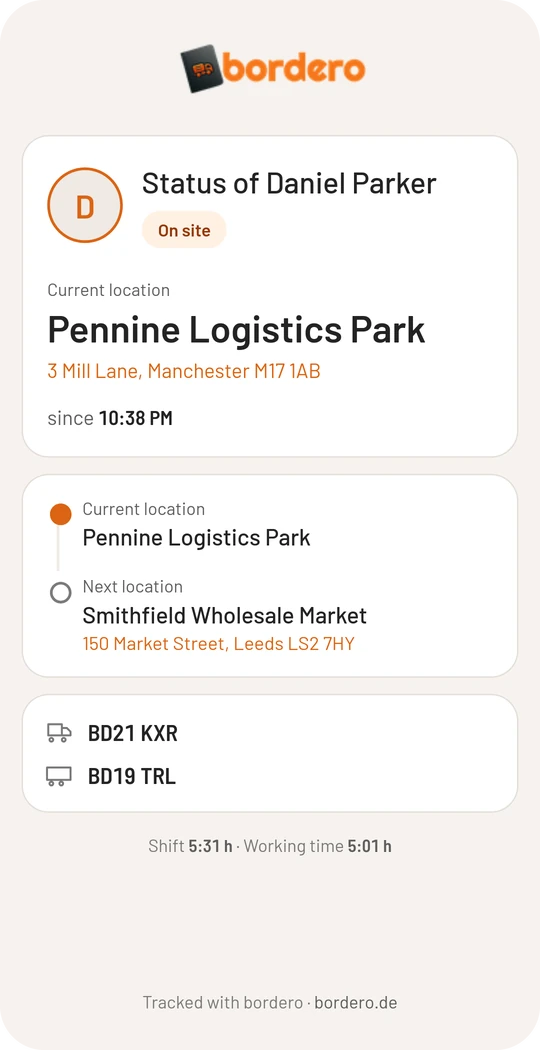
What it shows
- whether you are driving, standing at a location or taking a break
- loading or unloading
- your next destination
- shift time and work time
If no shift is running, it only says that there is no active shift at the moment. The page does not show earlier shifts, loads or mileage.
Switch it on and share the link
- Open Settings → Preferences and scroll to “Locations & status”.
- Switch on Public Status.
- Save the preferences. Your link then appears. Tap it to copy it, for example for a message to your family.
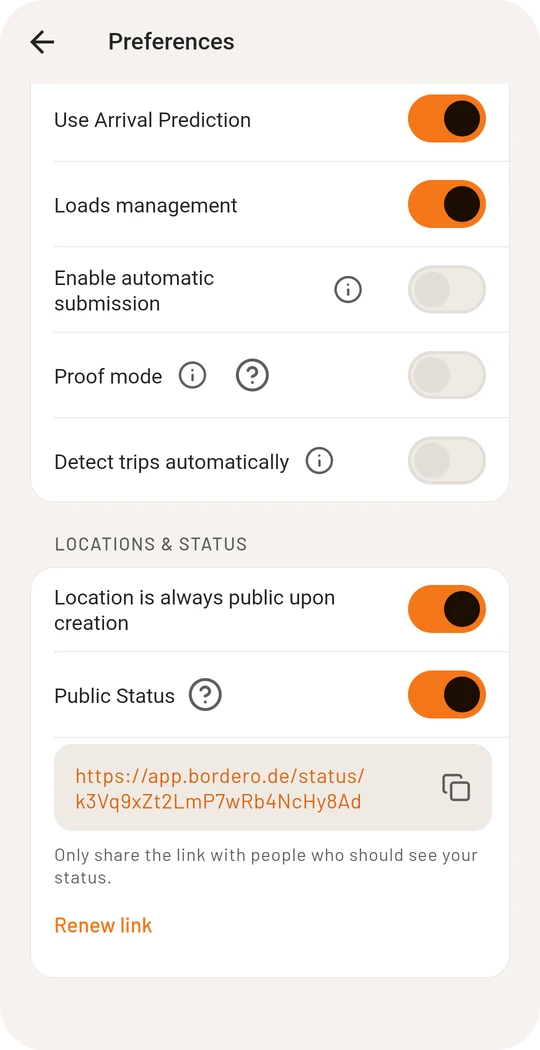
The link contains a random key that nobody can guess. Anyone who knows the link can open the page, so only pass it on to people who should see your status.
Renew the link
If the link got to the wrong people or you do not want it to stay valid, tap Renew link below it and confirm. You get a new link right away and the old one stops working. You then have to share the new link again.
Switching it off again
When you switch Public Status off, the page is unreachable at once. If you switch it back on, the same link applies as before, unless you renewed it.
The public status needs an account.